AI Restored Your Photo… But Something Looks Wrong?
We fix the mistakes AI leaves behind.
A few years ago, restoring an old family photo required specialised software, years of experience and countless hours of careful manual work.
Today, AI can remove scratches, colourise black-and-white images, sharpen blurry photographs and even attempt to reconstruct damaged faces in seconds. It's impressive. Until you look closely.
You've probably seen it yourself. A grandparent's face doesn't quite look right. An eye appears slightly distorted. Hair seems painted on. Clothing details vanish. Skin takes on an unnatural, plastic appearance. The colours might look vibrant, but they're often inaccurate.
At first glance, the image looks restored. At second glance, something feels off.
The Problem with AI Photo Restoration
Artificial intelligence is incredibly good at making educated guesses. That's the key word: guesses.
When AI encounters a damaged face, a missing hand, torn clothing or severe photo deterioration, it isn't magically recovering lost information. It's predicting what should be there, based on millions of other images it has seen before.
Unfortunately, your family photographs aren't millions of images. They're unique.
Your grandfather only had one face.
Your grandmother's wedding dress only existed once. The details that make a photograph meaningful are often the very details AI gets wrong.
Common AI Photo Restoration Mistakes We See
When customers send us AI-restored photographs, we regularly find:
- Facial features that no longer resemble the original person.
- Artificial, waxy or plastic-looking skin.
- Incorrect eye shapes or eye colours.
- Missing jewellery, buttons or clothing details.
- Unrealistic colourisation.
- Distorted hands and fingers.
- Smudged or melted-looking backgrounds.
- Over-sharpened details.
- Important historical elements removed by mistake.
The image may look cleaner than the original, but it often becomes less authentic.
How to Tell If AI Has Changed Your Photo
AI mistakes are easy to miss on a phone screen. Before you print, frame or share an AI-restored photo, take a few minutes to check it properly:
- Compare it side by side with the original, both at full size.
- Look at the eyes first. Check their shape, size, colour and which way they're looking.
- Check the hands, ears and teeth. AI often struggles with these.
- Look for small details such as jewellery, medals, badges, buttons and fabric patterns.
- Check the skin. Real skin has texture, lines and character. AI skin often looks smooth and waxy.
- Ask someone who knew the person whether it still looks like them.
If something doesn't feel right, trust that instinct. It usually means the AI has guessed.
Think you can spot AI's guesses? Put your eye to the test below.
Can you spot the 11 AI mistakes?
The first photo is a damaged original. The second is an AI “restoration” of it. It looks cleaner and sharper, but look closely. Tap either photo wherever something has been changed.
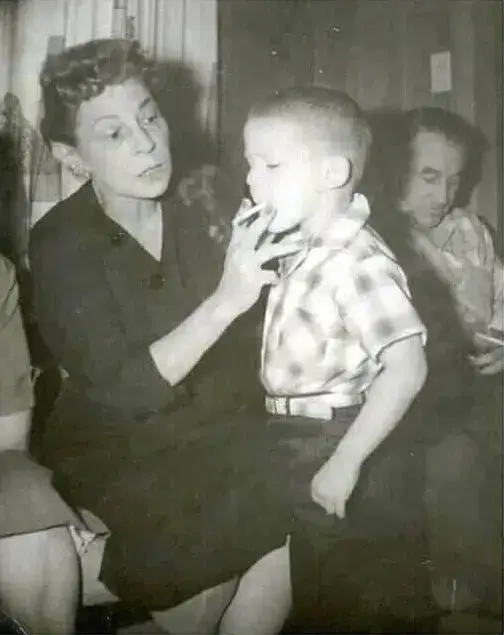
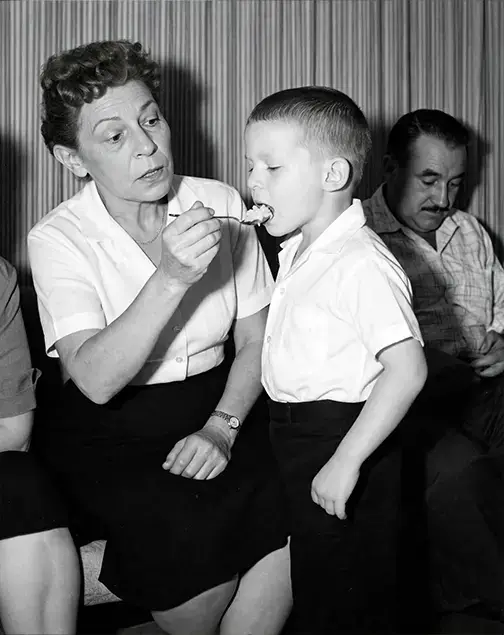
You found all 11.Here are all 11. AI didn’t just clean this photo up. It changed the people, the clothes, the room and even what was happening. These are exactly the kinds of changes we check for, and correct, in every AI restoration we fix.
- Not found yet…Background replaced. The lace curtain and wood-panelled wall have become striped wallpaper.
- Not found yet…Light switch removed. The switch plate on the wall has been painted out.
- Not found yet…Earring removed. Her earring has disappeared.
- Not found yet…Clothing changed. Her dark buttoned dress has become a white short-sleeved blouse.
- Not found yet…The moment itself changed. The cigarette at the boy's lips has become a spoonful of food, and his mouth is now wide open.
- Not found yet…Shirt changed. The boy's checked shirt is now plain white.
- Not found yet…Belt removed. His light-coloured belt has become a plain dark waistband.
- Not found yet…Watch added. A wristwatch has appeared, on a hand now resting in her lap.
- Not found yet…A different man. The man behind now has a thick moustache and a heavier face.
- Not found yet…Cigarette removed. The cigarette in the man's hand has gone.
- Not found yet…Clothing changed on the left. The relative's light dress with a lace hem has become a dark skirt.
The circled changes are the kinds of mistakes we regularly see when AI “restores” an old photo.
AI didn't restore your photo. It recreated it.
Photo restoration is about preserving history. AI often aims for an image that looks plausible, rather than one that stays faithful to the original.
That's why many AI restorations can look spectacular while still being historically inaccurate.
For some people, that's perfectly fine. But for family heirlooms, memorial and funeral portraits, military photographs and precious historical images, accuracy matters.
Our AI Restoration Rescue Service
If you've already run your image through an AI photo restoration app or tool and you're unhappy with the result, don't start over. Send it to us.
We'll assess the AI restoration, compare it against the original wherever possible, and identify the areas where important details have been altered, distorted or lost. Depending on the image, we can:
- Correct facial features so they look like the real person again.
- Restore details the AI removed.
- Repair AI-generated artefacts.
- Reconstruct damaged areas by hand.
- Refine colours and tones so they suit the era.
- Create a result that remains faithful to the original photograph.
Think of us as the quality control department AI doesn't have.
How It Works
- Upload your photos. Send us the AI-restored version and, if you have it, the original scan or photo.
- Get a free quote. We look at what the AI has changed and let you know what's possible. No pressure, ever.
- We correct it by hand. Faces, details and colours are repaired by a restoration artist, not another algorithm.
- Review your proofs. You see the work before it's finalised, and your feedback shapes the result.
- Receive your final files. High-resolution and ready to print, frame, share and treasure.
Still have the original print? For the best possible result, mail it to us or book an appointment at our Clarinda studio in Melbourne, so we can scan it ourselves at high resolution.
The Best Results Come from Human Judgement
We're not against AI. We use modern tools, including AI-assisted technology, where they genuinely help.
The difference is that every image is individually reviewed, corrected and refined by a restoration artist who understands what should and shouldn't be changed. After more than 20 years of restoring photographs for families across Melbourne and Australia, that judgement is what turns a plausible image into a faithful one.
Technology is powerful. But family history deserves more than a guess.
Still weighing up your options? Read our guide to AI photo restoration vs professional restoration, or find out how we digitally restore old photos without losing their soul.
Let Us Fix the Mess AI Made
If your AI restoration looks almost right, but not quite right, you're not alone. Many of our clients come to us after trying automated restoration tools first.
The good news is that most AI mistakes can be corrected. Upload your image today and we'll let you know what's possible.
Frequently Asked Questions
Why does my AI-restored photo look fake or wrong?
AI-restored photos often look wrong because the software guesses at missing detail instead of recovering it. When a face, hand or piece of clothing is damaged, AI fills the gap with features predicted from millions of other images, so the result can look plausible without looking like the real person. Common signs are plastic-looking skin, changed eye shapes, painted-on hair, distorted hands and colours that don't suit the era.
Can you fix a photo that was badly restored by AI?
Yes, in most cases AI restoration mistakes can be corrected. At Photo Restoration Rescue, a restoration artist assesses what the AI has changed, then corrects facial features, repairs AI artefacts, restores lost details and refines colours by hand. Results are best when you can also send the original photo or scan, and every image gets a free quote before any work begins.
Is AI photo restoration accurate?
AI photo restoration is fast, but it isn't always accurate, especially on badly damaged photos. It handles light scratches, dust and minor fading well, but struggles with damaged faces, missing sections, hands and historical details, where it tends to invent rather than restore. For heirlooms, memorial portraits and family history photos, a human review is the safest way to keep the image faithful.
What should I send you to fix an AI-restored photo?
Send the AI-restored image along with the original scan or photo, if you still have it. The original lets us compare the two and bring back details the AI altered or removed. You can upload both through our website for a free quote, or for the best results, mail the original print to us or bring it to our Clarinda studio in Melbourne so we can scan it ourselves.
Is professional photo restoration better than AI?
For important photos, professional restoration is usually more accurate than AI on its own. A restoration artist decides what should and shouldn't change, keeps real features such as wrinkles, jewellery and clothing details, and lets you review proofs before anything is finalised. AI can be a useful tool, but it can't know what your family members actually looked like.
Do you use AI in your photo restorations?
Yes, we use modern tools, including AI-assisted technology, where it helps, but never on its own. Every image is individually reviewed, corrected and refined by hand by Theodore, who has more than 20 years of photo restoration experience. You see proofs before your final files are delivered, and your feedback shapes the final result.
Restoring a photograph isn't about making it look different. It's about making it look like the person you remember.
Upload your AI-restored photo for a free quote, and we'll show you what's possible.
← Go Back